Network
Why does your home network matter more than ever, and how do you build one to last?
Every system in a modern house reports through the network, so a weak one makes the whole home feel unreliable. Here is what a network built to last includes, the signs yours is at its limit, and how Rivas Technology Group designs them across the South Sound.
Because every other system in the house reports through it: the alarm and cameras, the automation, the shades, the theater, the thermostat and the home office. A network built to last has a wired backbone, a router such as the Island, wired access points on every floor and documentation. Rivas Technology Group designs them across the South Sound.
By Ivan Rivas, Owner and Sales Engineer · 2025-11-17 · Updated 2026-09-17

Why is the network the most important system in the house?
Because every other system depends on it. In a home in Bonney Lake, Tacoma, Gig Harbor, Puyallup, University Place or Tehaleh, the automation and the alarm and cameras report over the network. So do the shades, the theater and streaming, the lighting, the video doorbell, the thermostat, Wi-Fi calling, the home office and the game console. It decides whether the smart home feels reliable or frustrating, and most homeowners find that out after the devices are in. If the network cannot carry the load, nothing works the way it should.
Why is a big-box router not enough?
Because it was built for a small apartment in 2014 and your house is not that. A modern South Sound home runs dozens of connected devices, several 4K streams at once, cameras that upload continuously, outdoor access points and gaming. Increasingly, it also runs fiber internet faster than the router can route. A consumer router does routing, Wi-Fi and switching in one plastic box placed wherever the cable enters. It fails at the edges first: the bedroom upstairs, the patio, the shop. Residential networking done properly separates those jobs.
What do we build with?
Four layers, each chosen for a ten-year life.
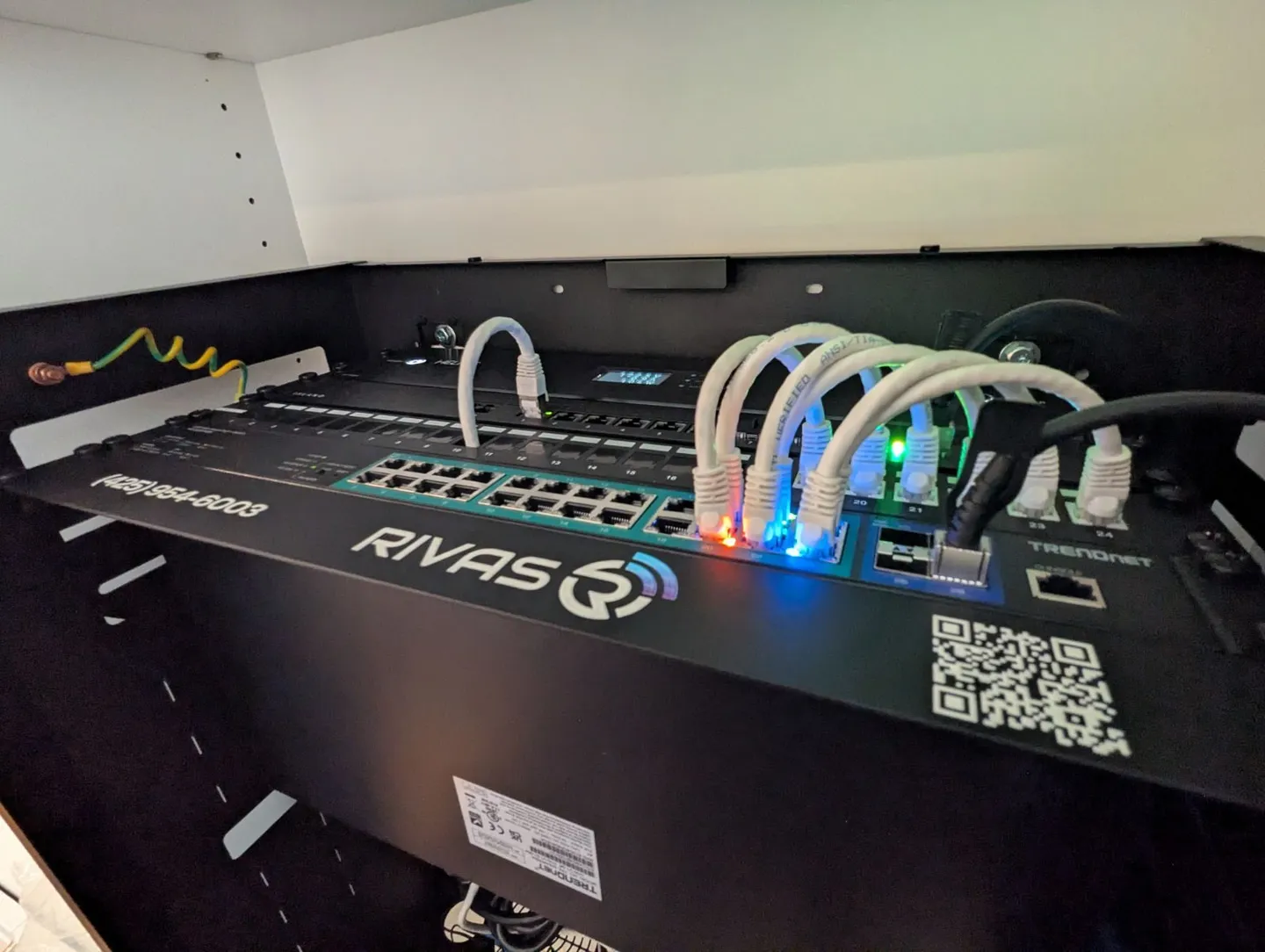
- Routing. An Island Router, a wired, subscription-free router built in the United States (Island Router), with a real firewall and no cloud dependency. Island handles 1 Gbps service and 5,000 devices; Island Pro handles 10 Gbps and 10,000.
- Wi-Fi. Alta Labs or Ruckus access points, wired, one per floor as a minimum. Alta Labs suits most homes; Ruckus suits large properties, new construction and heavy loads. Both give full speed in every room and clean roaming from the kitchen to the patio.
- Structured wiring. Cat6A and fiber where a run is long or an upgrade is likely. We use IFP Connect fiber-to-the-jack, Cleerline fiber and ICE Cable, labeled at both ends. Wi-Fi is only as strong as the cable feeding it, and good cable lasts longer than the electronics on either end.
- Outdoor coverage. Outdoor-rated access points under the eaves and weatherproof enclosures where needed. That puts the backyard, the shop and the driveway camera on the network too. See the Bonney Lake outdoor Wi-Fi install.
A PoE switch, a small rack, a UPS and VLANs that keep cameras, automation, guests and streaming apart complete the design. The full list is on the Wi-Fi and networking page.
What are the signs your network needs an upgrade?
The same list we hear on every call:
- buffering or pixelation while streaming;
- slow speed in certain rooms;
- cameras dropping offline in the app;
- weak or no Wi-Fi outdoors;
- smart devices that do not respond;
- automation that fails at random;
- a system that worked until more devices were added.
If any of these are familiar, the network is at its limit, and the fix is usually the network rather than the devices.
What about the FCC router rule?
It changes the buying decision, not the router you own. In March 2026 the FCC put foreign-produced consumer routers on its Covered List, which blocks authorization of new foreign-made models (Wiley). Installed routers stay legal and keep receiving updates under a waiver extended to at least January 1, 2029 (The Record). If you are replacing a router anyway, buy one that will still be sold and updated after 2029; Island is built in the US. The full picture is in the FCC router post.
How do we design it?
We do not guess. We map the Wi-Fi coverage with a meter, identify interference, and count the devices you run now and will run in three years. We plan the cable routes and place the access points where the signal needs them. Then we configure the router, switch and VLANs for the automation and security that ride on it. Then we test again at handoff and leave a network map. What drives the cost is the number of cable drops, access points and whether you need a rack and switch; the instant quote gives you a figure in minutes.
Need it installed?
Rivas Technology Group designs and installs home networks and the Island Router from Kent across the South Sound, including Bonney Lake, Tacoma, Puyallup, Gig Harbor, University Place and Tehaleh. Book a site survey.